
From the Mark I design of the product, this is everything we have done, the alterations, and what we are considering for Mark III of the Minimal Viable Product. Below is a list of all of the progress that has been made since the initial design presentation.
An issue that arrose during the Mark I prototype was the sensor was showing noise still. However this wasn't from the circuit filtering not being adaquate, it was mechanical because when adjusted correctly the signal would show. So we made the photosensor be more recessed into the clip. We also made the LED poke more into the finger casing so more IR waves enter the casing. Finally, we also decided to remove the second LED. For the future, we are working on making a housing case to store all of the circuitry for both the pulseometer and the LCD screen.
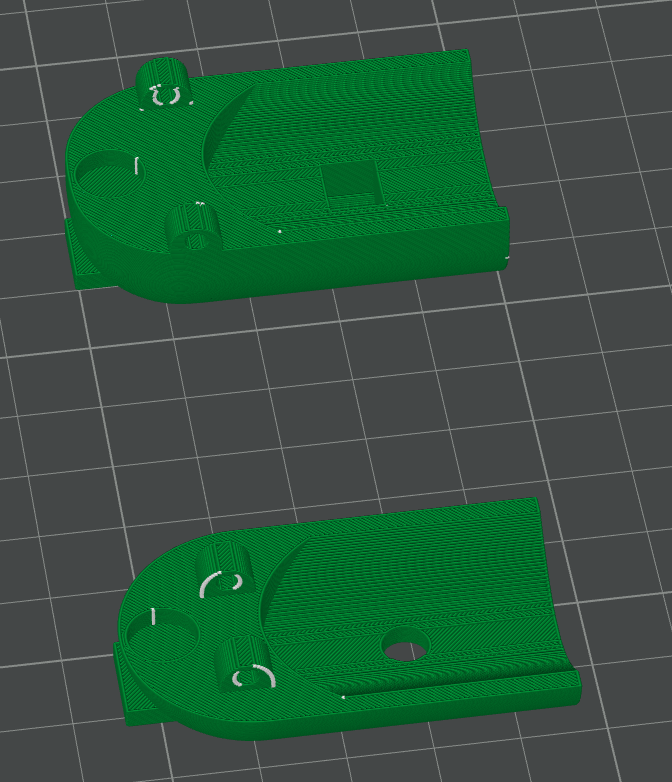
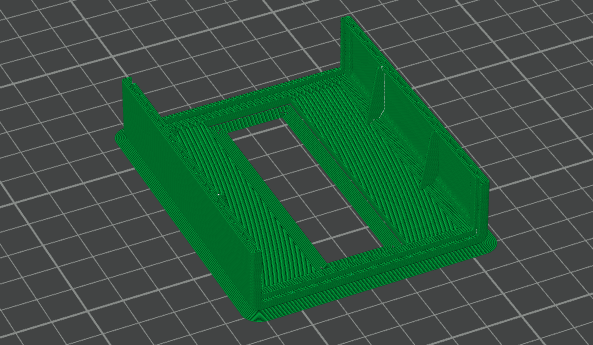
From Mark I, we convered all the code back into the arduino and have no python coding. There was two reasons for this. The first was in order to have the pulseometer be stand alone and not rely being connected to a laptop, all of the code had to run on the arduino. The second reason is the code that was in the ardunio to code in python is mutually exclusive to the code nessecary to having the LCD screen run. So the best choice was to convert it all. Right now there is an issue with the code where the filtering is different from the python code. The python code used a Savitzky-Golay filter, but the arduino code right now uses a "moving average" to filter. The following is the new code that is in the arduino currently:
    #include

LiquidCrystal lcd(12, 11, 5, 4, 3, 2);

// ============================================================
// Custom characters
// ============================================================
byte skull[8] = {
  0b01110,
  0b10101,
  0b11011,
  0b01110,
  0b01110,
  0b00000,
  0b01110,
  0b00000
};

byte heart[8] = {
  0b00000,
  0b01010,
  0b11111,
  0b11111,
  0b01110,
  0b00100,
  0b00000,
  0b00000
};

// ============================================================
// 1) Settings
// ============================================================
const int PULSE_PIN = A0;
const int SAMPLE_INTERVAL = 20;
const int WINDOW = 200;

// ============================================================
// 2) Smoothing
// ============================================================
const int SMOOTH_WINDOW = 11;
float smoothBuffer[SMOOTH_WINDOW];
int smoothIndex = 0;

float smoothSample(float newVal) {
  smoothBuffer[smoothIndex] = newVal;
  smoothIndex = (smoothIndex + 1) % SMOOTH_WINDOW;
  float sum = 0;
  for (int i = 0; i < SMOOTH_WINDOW; i++) sum += smoothBuffer[i];
  return sum / SMOOTH_WINDOW;
}

// ============================================================
// 3) Circular buffer
// ============================================================
float samples[WINDOW];
int sampleIndex = 0;
int totalSamples = 0;

// ============================================================
// 4) Peak Detection
// ============================================================
const int MIN_DISTANCE = 25;
const float PROMINENCE = 0.003;

int peakIndices[20];
int peakCount = 0;

void detectPeaks() {
  peakCount = 0;
  int lastPeak = -MIN_DISTANCE;

  for (int i = 1; i < WINDOW - 1; i++) {
    float prev = samples[(sampleIndex + i - 1) % WINDOW];
    float curr = samples[(sampleIndex + i) % WINDOW];
    float next = samples[(sampleIndex + i + 1) % WINDOW];

    if (curr <= prev || curr <= next) continue;
    if (i - lastPeak < MIN_DISTANCE) continue;

    float leftMin = curr;
    for (int j = max(0, i - MIN_DISTANCE); j < i; j++)
      leftMin = min(leftMin, samples[(sampleIndex + j) % WINDOW]);

    float rightMin = curr;
    for (int j = i + 1; j <= min(WINDOW - 1, i + MIN_DISTANCE); j++)
      rightMin = min(rightMin, samples[(sampleIndex + j) % WINDOW]);

    float prom = curr - max(leftMin, rightMin);
    if (prom < PROMINENCE) continue;

    peakIndices[peakCount++] = i;
    lastPeak = i;
    if (peakCount >= 20) break;
  }
}

// ============================================================
// 5) BPM Calculation
// ============================================================
float calculateBPM() {
  if (peakCount < 2) return -1;

  float totalInterval = 0;
  for (int i = 1; i < peakCount; i++)
    totalInterval += peakIndices[i] - peakIndices[i - 1];

  float avgInterval = totalInterval / (peakCount - 1);
  float fs = 1000.0 / SAMPLE_INTERVAL;
  return 60.0 / (avgInterval / fs);
}

// ============================================================
// 6) Setup
// ============================================================
void setup() {
  Serial.begin(9600);
  lcd.begin(16, 2);
  lcd.createChar(0, skull);
  lcd.createChar(1, heart);
  lcd.clear();
  lcd.setCursor(0, 0);
  lcd.print("Pulseometer ");
  lcd.write(byte(1));  // heart on startup
  lcd.setCursor(0, 1);
  lcd.print("BPM: --");

  for (int i = 0; i < WINDOW; i++) samples[i] = 0.5;
  for (int i = 0; i < SMOOTH_WINDOW; i++) smoothBuffer[i] = 0.5;
}

// ============================================================
// 7) Loop
// ============================================================
unsigned long lastSample = 0;
unsigned long lastBPMUpdate = 0;
unsigned long zeroBPMStart = 0;

void loop() {
  if (millis() - lastSample >= SAMPLE_INTERVAL) {
    lastSample = millis();

    int raw = analogRead(PULSE_PIN);
    float inv = 1.0 - (raw / 1023.0);
    float smoothed = smoothSample(inv);

    samples[sampleIndex] = smoothed;
    sampleIndex = (sampleIndex + 1) % WINDOW;
    if (totalSamples < WINDOW) totalSamples++;

    Serial.println(smoothed);
  }

  if (millis() - lastBPMUpdate >= 2000 && totalSamples >= WINDOW) {
    lastBPMUpdate = millis();

    detectPeaks();
    float bpm = calculateBPM();

    if (bpm > 0) {
      // valid BPM - reset timer, show heart
      zeroBPMStart = 0;

      lcd.setCursor(0, 0);
      lcd.print("Pulseometer ");
      lcd.write(byte(1));  // heart
      lcd.print("   ");

      lcd.setCursor(0, 1);
      lcd.print("BPM: ");
      lcd.print(bpm, 1);
      lcd.print("   ");

    } else {
      // no BPM - start timer
      if (zeroBPMStart == 0) zeroBPMStart = millis();

      if (millis() - zeroBPMStart >= 500) {
        // 5 seconds with no pulse - show skull
        lcd.setCursor(0, 0);
        lcd.print("Pulseometer ");
        lcd.write(byte(0));  // skull
        lcd.print("   ");

        lcd.setCursor(0, 1);
        lcd.print("BPM: ---    ");

      } else {
        // waiting - keep heart, show --
        lcd.setCursor(0, 0);
        lcd.print("Pulseometer ");
        lcd.write(byte(1));  // heart
        lcd.print("   ");

        lcd.setCursor(0, 1);
        lcd.print("BPM: --     ");
      }
    }
  }
}
Most current circuit design shown below:
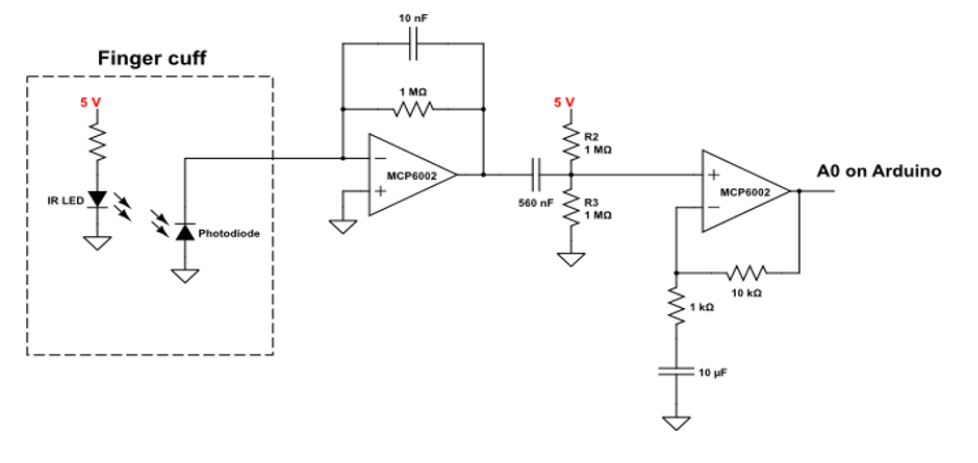
This circuit is made up of four components. Going left to right, the first component is the finger cuff, this is where the patient interacts with the device. The finger cuff will be in the shape of a finger clip, with the IR LED and the photodiode positioned on opposite sides of the finger. The photodiode converts light into electrical current with a high sensitivity and linearity, which is helpful for the small signals we are working with. The second component is the transimpedance amplifier (TIA). The current from the photodiode flows to the negative terminal of the op-amp and through the gain-setting resistor. This creates a voltage at the output of the op-amp that is proportional to the input current - the capacitor helps reduce noise. Next is a simple highpass filter; we are removing the DC baseline signal that comes from the natural absorbance and scattering from the tissue. The last component is a non-inverting gain op-amp. This amplifies the signal by a factor of R2/R1 (the ratio of the resistor in the feedback loop to the resistor connected to ground). The capacitor in this stage blocks the DC signal that we added in the previous stage, amplifying only the AC signal that we care about.
The goal of this whole process is to isolate the signal we care about (absorbance from oxygenated hemoglobin) and amplify it while removing background signal / noise. In this circuit there is already signal processing with multiple built-in filters, but there is more signal processing that has to happen in arduino. In order to remove background noise from the environment, we can use background subtracted signal. We blink the IR LED on and off (50-500Hz) and measure the signal in the on versus off state. Subtracting these two values will give us a reading that is roughly independent of the surrounding conditions - like ambient lighting or different placements of the device on the finger. Furthermore, in order to give a heart rate in bpm, it is necessary to real-time peak detection on the signal. This peak detection becomes very hard with noisy signal, but assuming we can tune our filter appropriately, this peak detection can be done with a simple cut off. If the signal is higher than some predetermined baseline and the signal goes from increasing to decreasing (instantaneous derivative = 0) then we can mark a peak. Time average between peaks gives the users real-time bpm.
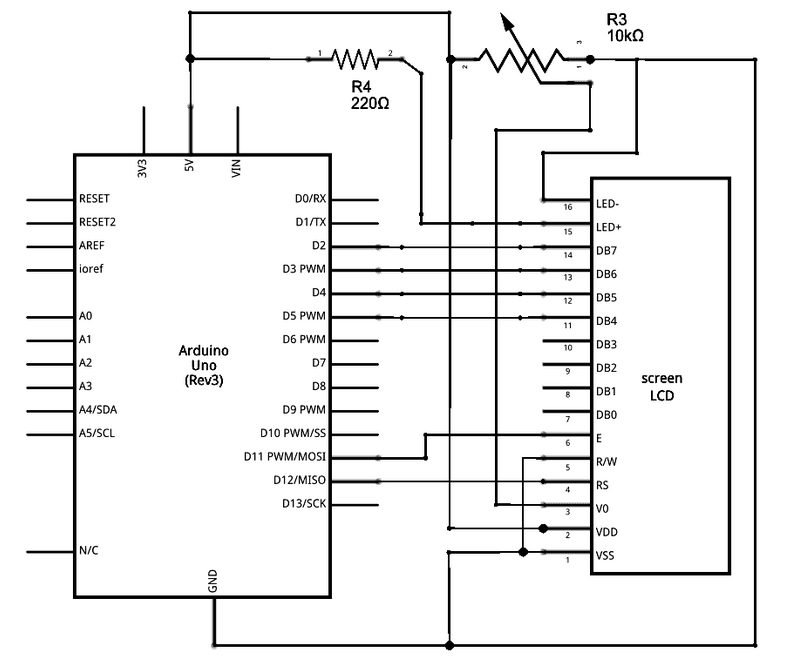
From mark I to now, the circuit of the pulseometer has not changed. The only difference is now we have a circuit for the LDC screen. The screen circuitry is shown below.
Our pulseometer, like commercial products, is based on photoplethysmography (PPG). PPG is an optical technique based on the Beer-Lambert law, and it can be used to measure physiologic information about a patient. When a patient’s skin is illuminated with specific wavelengths of light, the absorbance fluctuates in accordance with the flow of blood through that area of tissue. If one can measure this real-time absorbance, it is possible to extract information about not only heart rate, but blood oxygen saturation, respiratory rate, and even sleep quality
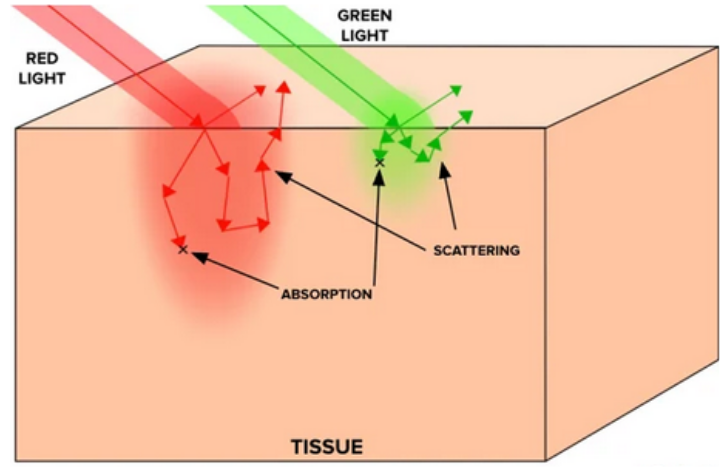
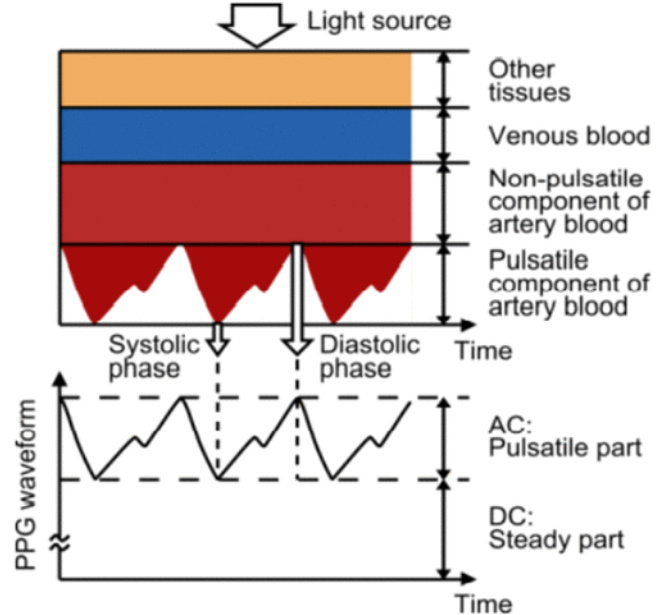
Our project will use transmittance PPG, where the light source is positioned opposite to the light collecting device, so the signal must travel through the appendage (fingertip) as demonstrated in the figure. In order to pick up small absorbance changes in pulsatile artery blood, we need to understand the optical properties of tissue and blood. Considering we are using transmittance PPG, light must be able to travel through the fingertip without getting completely absorbed or scattered out. Light scattering in tissue can be modeled with a power law relationship:
Depending on the tissue, b could be anywhere between 0.7-1.5. It is clear that as wavelength decreases, scattering increases, and we see a similar trend for absorption. Absorption follows the Beer-Lambert law:
Which can be re-expressed as:
Re-arranging the expressions above we see that μa ∝ cε. However, in tissue samples this becomes slightly more complicated, as the Beer-Lambert law assumes the presence of only one absorber. In skin and tissue there are many absorbers, so we can express this with a sum:
Each of these absorbers has slightly different molar extinction coefficients (melanin and other chromophores in the skin exhibit strong light absorption in the 200-500nm range, whereas water and lipids become more significant past 800nm). Absorbance is not as simple as scattering, but in general molar extinction coefficients for relevant organic molecules in the skin become stronger at lower wavelengths. Therefore if the goal is for light to travel all the way through tissue, it is more helpful to use a higher wavelength of light. It must still be a wavelength that can pick up on vascular activity; that is, it must be absorbed or scattered just enough so that we can detect a change when blood flow is occurring.
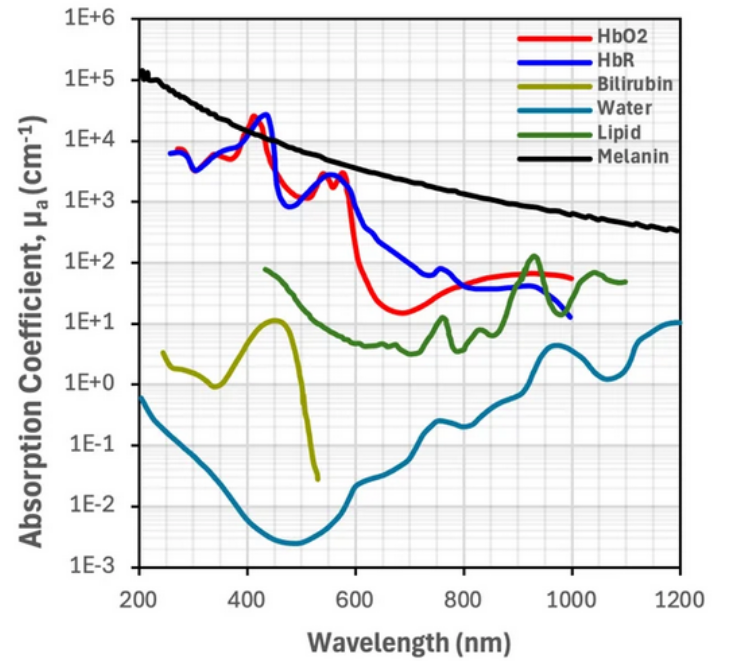
Deoxygenated and oxygenated hemoglobin absorb some wavelengths light equally (red-NIR), but some wavelengths differently, and this contrast allows us to collect absorbance data. Infrared light (850-1000nm) is more absorbed by oxygenated hemoglobin, while deoxygenated hemoglobin has stronger absorption of red light (650–750nm). In commercial devices, the difference between these absorbance ranges allows one to measure blood oxygen saturation. However, for the purpose of this device we will therefore be using infrared light, as it will have enough penetration depth into the tissue to be detected with transmittance PPG while also being sufficiently scattered / absorbed by oxygenated blood for us to detect it.